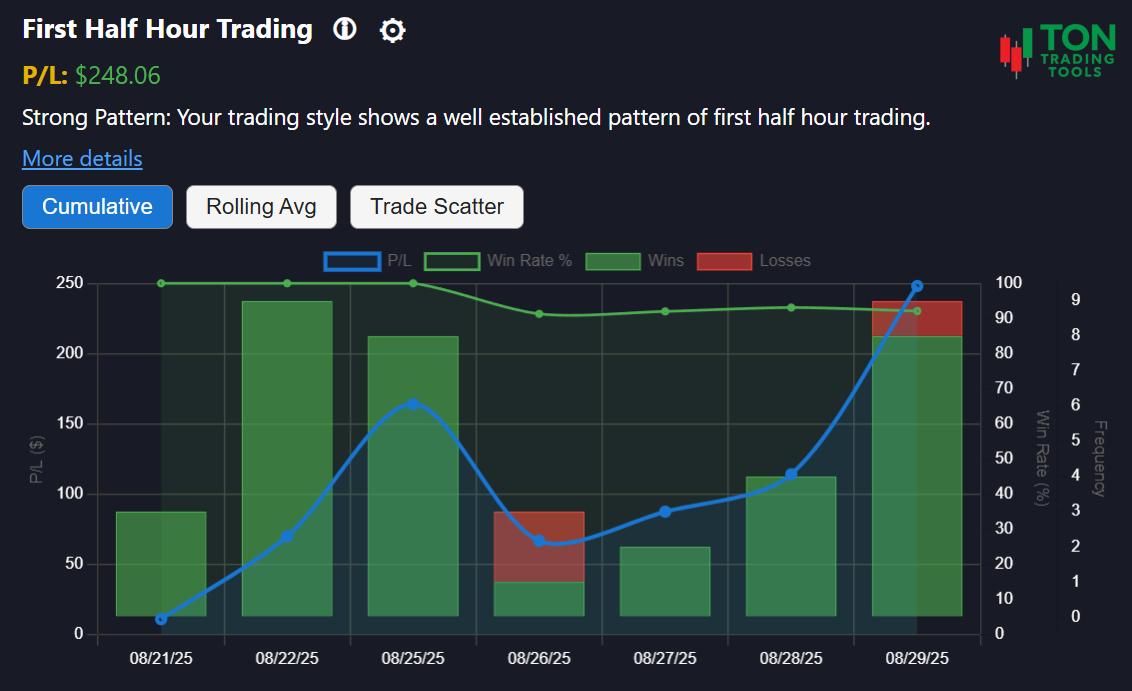
Near-Open Trading Pattern: Analyze Your Morning Activity
The Near-Open Trading Pattern tool is designed for Thinkorswim desktop users who want to understand their behavior during the most volatile part of the day. Are you consistently placing trades within the first 15 minutes of the market open? This tool analyzes your trade history to reveal patterns of "Near-Open" trading, helping you identify if you are following a strategy or simply reacting to the morning rush.
This is not a technical analysis tool. Instead, it focuses on your actual trading decisions—specifically, days when your trades were primarily placed between 9:30 AM and 9:45 AM EST. Use this insight to improve your discipline, manage risk, and determine if the opening volatility is working for or against you.
For a deeper understanding of your trading discipline, try our Scalping Behavior Pattern and Extended Hours Trading Pattern.
How Near-Open Pattern Detection Works
Pattern Detection
- Identifies days when trades are placed within the first 15 minutes (9:30–9:45 AM EST)
- Tracks your activity over a 90-day lookback window
- Classifies your pattern as Emerging, Confirmed, or Strong
Pattern Strength
- Emerging Pattern: 3+ days of trading near the open
- Confirmed Pattern: 10+ days of trading near the open
- Strong Pattern: 15+ days of trading near the open
Why It Matters
- The market open is characterized by high volatility and unpredictable price action
- Recognizing your dependency on this window helps you manage risk and improve results
- Combine with Volatility Based Risk Calculator for a complete discipline and risk profile
Supported Patterns & Related Tools
- Near-Open Trading Pattern (this page)
- Extended Hours Trading Pattern
- Scalping Behavior Pattern
- Symbol Attachment Bias
- Volatility Based Risk Calculator
- Pattern Comparison Overview
Get Started Today
Ready to see if you have a near-open trading bias? Upload your Thinkorswim desktop trade files and let the Near-Open Trading Pattern tool analyze your history. For best results, review your patterns at the end of each trading day.
FAQ
Frequently Asked Questions
Answers to common questions about the Near-Open Trading Pattern tool for Thinkorswim desktop.

This tool analyzes your Thinkorswim desktop trade history to detect days when you place trades within the first 15 minutes of the market session (9:30–9:45 AM EST).
A near-open event is flagged if your trades occur between 9:30 AM and 9:45 AM EST. The tool reviews your trade history over a 90-day window to identify behavioral trends.
The market open is characterized by extreme volatility. Recognizing this pattern helps you assess if you are following a structured strategy or reacting impulsively to morning price movements.
The Near-Open Trading Pattern tool is currently available only for Thinkorswim desktop users.