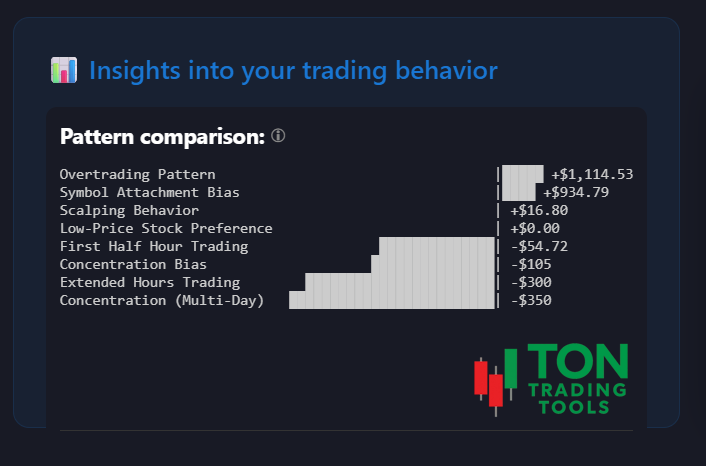
Pattern Comparison: Discover Your Real Trading Habits
The Pattern Comparison tool is designed for Thinkorswim desktop users who want to go beyond simple P&L and truly understand their trading process. This is not a chart analysis tool—it’s a behavioral analysis engine that reveals how you actually trade, so you can optimize your edge.
Upload your Thinkorswim trade files and instantly see which patterns dominate your trading. Are you consistently overtrading, trading too much in the first 30 minutes, or showing concentration bias? Pattern Comparison helps you spot strengths, weaknesses, and actionable opportunities for improvement.
All analysis is based on your real trading data—no guesswork, no generic advice. Interact with detailed pattern pages to learn more about each discipline and how it impacts your results.
Supported Trading Patterns
Price Discipline
Time Discipline
Execution Discipline
Diversity Discipline
Want to see how these patterns interact? Try the Index Comparison Chart to benchmark your results against the S&P 500.
Why Analyze Trading Patterns?
Most traders focus on their P&L, but your real edge comes from understanding your process. Pattern Comparison shows you which habits are helping—or hurting—your results. Use this insight to make targeted improvements and build a more consistent trading routine.
| Common Trading Habits | Pattern Comparison Reveals |
|---|---|
| Overtrading without realizing it | See your overtrading frequency and impact |
| Trading the same symbol repeatedly | Spot symbol attachment and diversify |
| Ignoring time-of-day effects | Analyze your trades by time discipline |
| Concentration in a few stocks | Measure your concentration bias |
Advanced Features
Pattern Comparison is built for real traders using Thinkorswim desktop. Features include:
- Automatic pattern detection from your trade history
- Detailed breakdowns by discipline and pattern
- Direct links to learn more about each pattern
- Optimized for day trading review and process improvement
- SEO-friendly interlinking for fast access to all platform features
Get Started Today
Ready to see your trading patterns in a new light? Upload your Thinkorswim desktop trade files and let Pattern Comparison do the rest. For best results, review your patterns at the end of each trading day.
FAQ
Frequently Asked Questions
Answers to common questions about the Pattern Comparison tool for Thinkorswim desktop.

Pattern Comparison analyzes your actual trading patterns—not chart setups—using your Thinkorswim desktop trade history. It helps you identify which habits are driving your results.
No, Pattern Comparison is not a chart analysis tool. It focuses on your trading behavior and process, not technical chart patterns.
Pattern Comparison is currently available only for Thinkorswim desktop users. Support for other platforms may be added in the future.
Each supported pattern has a dedicated detail page. Click the pattern names above to learn more about Price Discipline, Time Discipline, Execution Discipline, and Diversity Discipline.